Google dance an expression that means the google's search engine index update.
This is one of the reasons why people complain about their websites are moving up&down without a reason.
sexta-feira, 8 de agosto de 2008


Is CSS positive to Google rank? / Usar CSS é positivo para o google rank?
We already know that google takes into consideration a lot of factors to classify the pages. After some research about using CSS I tried to answer to the following question: is using CSS positive to google ranking or not?
The answer is positive. By using CSS there are (at least) 2 positive factors:
- The files (the html) is smaller which is positive
- CSS helps to maintain a better structure of the html page, by separating the content and structure from the layout and look&feel
/
Aparentemente a utilização dos CSS é positiva:
- Usando CSS os ficheiros (o html) fica com tamanho menor - o que teoricamente é positivo
- A utilização dos CSS normalmente ajuda a que a estrutura da página html seja melhor, já que separa o conteúdo da formatação
Já se sabe que o google entra em consideração com muitos aspectos para classificar as páginas. Fiz alguma investigação sobre o uso de CSS: será que influencia positivamente ou negativamente a classificação do google?
Aparentemente a utilização dos CSS é positiva:
- Usando CSS os ficheiros (o html) fica com tamanho menor - o que teoricamente é positivo
- A utilização dos CSS normalmente ajuda a que a estrutura da página html seja melhor, já que separa o conteúdo da formatação
The answer is positive. By using CSS there are (at least) 2 positive factors:
- The files (the html) is smaller which is positive
- CSS helps to maintain a better structure of the html page, by separating the content and structure from the layout and look&feel
/
Aparentemente a utilização dos CSS é positiva:
- Usando CSS os ficheiros (o html) fica com tamanho menor - o que teoricamente é positivo
- A utilização dos CSS normalmente ajuda a que a estrutura da página html seja melhor, já que separa o conteúdo da formatação
Já se sabe que o google entra em consideração com muitos aspectos para classificar as páginas. Fiz alguma investigação sobre o uso de CSS: será que influencia positivamente ou negativamente a classificação do google?
Aparentemente a utilização dos CSS é positiva:
- Usando CSS os ficheiros (o html) fica com tamanho menor - o que teoricamente é positivo
- A utilização dos CSS normalmente ajuda a que a estrutura da página html seja melhor, já que separa o conteúdo da formatação
quinta-feira, 7 de agosto de 2008
Akelos PHP Framework How to create an application
In the last post I told you how to install Akelos, if you had a problem just post a comment and we'll try to help you.
Now I will try to explain what happened when you installed that "booklink" application previously.
Go to database and see what it looks like:
mysql -u root -p booklink_dev
and do
show tables;
desc books;
Now, check the file app/installers/book_installer.php (inside the booklink dir).
This is where the default data entity is defined. Akelos created it for you. This is used to create the database table that stores the books.
Change it to:
function up_1(){
$this->createTable('books',
'id,'. // the key
'title,'. // the title of the book
'description,'. // a description of the book
'author_id,'. // the author id. This is how Akelos will know how to link
'published_on' // the publication date
);
$this->createTable('authors',
'id,'. // the key
'name' // the name of the author
);
}
function down_1(){
$this->dropTables('books','authors');
}
Please note that there are naming conventions for the column names (for instance if the column name is id, then it's the primary key, and if suffix is _at then it's a datetime, etc.) To full control all your tables, check http://phplens.com/lens/adodb/docs-datadict.htm (I didn't by now)
Now, to update our application with this new model, we need to migrate (execute it from booklink directory):
php script/migrate book install
Now you can go to the database
mysql -u root -p booklink_dev
and do
show tables;
desc books;
desc authors;
Now we need to create the scaffold for both entities: books and authors.
To do so, we will execute:
php script/generate scaffold book
and
php script/generate scaffold author
If you get this error:
There where collisions when attempting to generate the scaffold.
Please add force=true to the argument list in order to overwrite existing files.
Then do:
php script/generate scaffold book --force
and
php script/generate scaffold author --force
(the --force will akelos to rewrite some files)
Now check your application. Cool isn't it?
Now I will try to explain what happened when you installed that "booklink" application previously.
Go to database and see what it looks like:
mysql -u root -p booklink_dev
and do
show tables;
desc books;
Now, check the file app/installers/book_installer.php (inside the booklink dir).
This is where the default data entity is defined. Akelos created it for you. This is used to create the database table that stores the books.
Change it to:
function up_1(){
$this->createTable('books',
'id,'. // the key
'title,'. // the title of the book
'description,'. // a description of the book
'author_id,'. // the author id. This is how Akelos will know how to link
'published_on' // the publication date
);
$this->createTable('authors',
'id,'. // the key
'name' // the name of the author
);
}
function down_1(){
$this->dropTables('books','authors');
}
Please note that there are naming conventions for the column names (for instance if the column name is id, then it's the primary key, and if suffix is _at then it's a datetime, etc.) To full control all your tables, check http://phplens.com/lens/adodb/docs-datadict.htm (I didn't by now)
Now, to update our application with this new model, we need to migrate (execute it from booklink directory):
php script/migrate book install
Now you can go to the database
mysql -u root -p booklink_dev
and do
show tables;
desc books;
desc authors;
Now we need to create the scaffold for both entities: books and authors.
To do so, we will execute:
php script/generate scaffold book
and
php script/generate scaffold author
If you get this error:
There where collisions when attempting to generate the scaffold.
Please add force=true to the argument list in order to overwrite existing files.
Then do:
php script/generate scaffold book --force
and
php script/generate scaffold author --force
(the --force will akelos to rewrite some files)
Now check your application. Cool isn't it?
Installing Akelos on Windows
Install Akelos on Windows with a example.
I'm assuming that there's an Apache 2 installed and a PHP 5 in the machine.
First download akelos framework
http://www.akelos.org/download
Then extract it, for example, to
c:\akelos_framework
then execute go to c:\akelos_framework and execute
php script/setup -d c:\httpdocs\booklink
(I'm assuming that c:\httpdocs is your Apache DocumentRoot)
Now create the database:
mysql -u root -p
Enter password: ******
Welcome to the MySQL monitor. Commands end with ; or \g.
Your MySQL connection id is 2
Server version: 5.0.41-community-nt MySQL Community Edition (GPL)
Type 'help;' or '\h' for help. Type '\c' to clear the buffer.
mysql> CREATE DATABASE booklink;
Query OK, 1 row affected (0.00 sec)
mysql> CREATE DATABASE booklink_dev;
Query OK, 1 row affected (0.02 sec)
mysql> CREATE DATABASE booklink_tests;
Query OK, 1 row affected (0.01 sec)
mysql> GRANT ALL ON booklink.* TO cassio@localhost IDENTIFIED BY "pass";
Query OK, 0 rows affected (0.09 sec)
mysql>
mysql> GRANT ALL ON booklink_dev.* TO cassio@localhost IDENTIFIED BY "pass";
Query OK, 0 rows affected (0.00 sec)
mysql>
mysql> GRANT ALL ON booklink_tests.* TO cassio@localhost IDENTIFIED BY "pass";
Query OK, 0 rows affected (0.00 sec)
mysql>
mysql> FLUSH PRIVILEGES;
Query OK, 0 rows affected (0.00 sec)
mysql> exit;
Bye
Open in the browser:
http://127.0.0.1/booklink/public/
should display :
Welcome aboard
You’re using The Akelos Framework!
Getting started
1.
Configure your environment
Run a step by step wizard for creating a configuration file or read README.txt instead.
Start the configuration wizard
Configure your database according to the DB you've created previously.
Configure your language (in my case for example: pt,pt_PT)
Then go to command line, to the c:\httpdocs\booklink directory and run
php script/generate scaffold Book
which will tell you that some files where created.
Now... magic: just go to http://127.0.0.1/booklink/book and start playing with your application!!!
I will be posting the next round in a short time: how to create your own application
I'm assuming that there's an Apache 2 installed and a PHP 5 in the machine.
First download akelos framework
http://www.akelos.org/download
Then extract it, for example, to
c:\akelos_framework
then execute go to c:\akelos_framework and execute
php script/setup -d c:\httpdocs\booklink
(I'm assuming that c:\httpdocs is your Apache DocumentRoot)
Now create the database:
mysql -u root -p
Enter password: ******
Welcome to the MySQL monitor. Commands end with ; or \g.
Your MySQL connection id is 2
Server version: 5.0.41-community-nt MySQL Community Edition (GPL)
Type 'help;' or '\h' for help. Type '\c' to clear the buffer.
mysql> CREATE DATABASE booklink;
Query OK, 1 row affected (0.00 sec)
mysql> CREATE DATABASE booklink_dev;
Query OK, 1 row affected (0.02 sec)
mysql> CREATE DATABASE booklink_tests;
Query OK, 1 row affected (0.01 sec)
mysql> GRANT ALL ON booklink.* TO cassio@localhost IDENTIFIED BY "pass";
Query OK, 0 rows affected (0.09 sec)
mysql>
mysql> GRANT ALL ON booklink_dev.* TO cassio@localhost IDENTIFIED BY "pass";
Query OK, 0 rows affected (0.00 sec)
mysql>
mysql> GRANT ALL ON booklink_tests.* TO cassio@localhost IDENTIFIED BY "pass";
Query OK, 0 rows affected (0.00 sec)
mysql>
mysql> FLUSH PRIVILEGES;
Query OK, 0 rows affected (0.00 sec)
mysql> exit;
Bye
Open in the browser:
http://127.0.0.1/booklink/public/
should display :
Welcome aboard
You’re using The Akelos Framework!
Getting started
1.
Configure your environment
Run a step by step wizard for creating a configuration file or read README.txt instead.
Start the configuration wizard
Configure your database according to the DB you've created previously.
Configure your language (in my case for example: pt,pt_PT)
Then go to command line, to the c:\httpdocs\booklink directory and run
php script/generate scaffold Book
which will tell you that some files where created.
Now... magic: just go to http://127.0.0.1/booklink/book and start playing with your application!!!
I will be posting the next round in a short time: how to create your own application
sábado, 2 de agosto de 2008
Extender o tamanho de uma partição no Windows XP
Para o caso em que têm no vosso Windows XP duas partições (C: e D: por exemplo) e querem juntá-las numa só, aqui seguem algumas dicas de como o podem fazer. Vamos supor que querem juntar a D: à C: e ficar apenas com uma partição C:, com todo o espaço disponível.
O primeiro passo é fazer um backup de uma das partições (por exemplo a D:) por forma a eliminar a partição (apenas uma das partições tem que ser removida e os dados da partição a manter, C:, ficam inalterados e não são perdidos).
1. Usando a ferramenta da Microsoft, Diskpart
O Windows XP traz uma ferramenta, Diskpart, que permite executar esse tipo de operações. Para tal, vão ao menu START > Run e digitem o comando "cmd". Na janela de DOS:
Diskpart failed to extend the volume. Please make sure the volume is valid for extending
Nestes casos, não é possível extender a partição usando a ferramenta da Microsoft. No ponto 2. é detalhada uma alternativa usando uma ferramenta disponível na Internet (grátis para uso pessoal).
Para mais informações sobre a ferramenta Diskpart, consultem a seguinte página http://support.microsoft.com/kb/325590.
2. Usando ferramenta EASEUS Partition Manager
Esta ferramenta está disponível para download aqui. Após a instalação, devem seguir os passos:
Seleccionar a partição a extender
Escolhar a opção Resize/Move
Esticar a barra delimitadora do tamanho até ao máximo possível.

Seleccionar "Apply"
Ao fazerem "Apply" vai ser pedido para fazerem um restart, e ao reiniciar o Windows as alterações serão aplicadas. Caso nessa operação obtenham uma mensagem de erro ( por exemplo "Error Code 9"), entrem novamente no Windows e:
Control Panel > Administrative Tools > Computer Management > Disk Management
Cliquem no disco com o botão do lado direito e seleccionem "Properties"
Seleccionem a tab "Tools"
"Check Now" e e seleccionem as duas opções ("Automatically fix file system errors" e "Scan for and attempt recovery of bad sectors")
Novamente será pedido um restart e a verificação do disco é feita durante o arranque do windows.
Quando o Windows arrancar, voltem a repetir os passos efectuados com a ferramenta EASUS Partition Manager e após fazerem "Apply" e reiniciar o computador, a operação deverá funcionar e o tamanho total de C:+D: estará agora todo na partição C: sem perda dos dados existentes na partição.
O primeiro passo é fazer um backup de uma das partições (por exemplo a D:) por forma a eliminar a partição (apenas uma das partições tem que ser removida e os dados da partição a manter, C:, ficam inalterados e não são perdidos).
1. Usando a ferramenta da Microsoft, Diskpart
O Windows XP traz uma ferramenta, Diskpart, que permite executar esse tipo de operações. Para tal, vão ao menu START > Run e digitem o comando "cmd". Na janela de DOS:
C:\> diskpartComo pretendemos remover a partição D: (após terem sido copiados todos os dados dessa partição), devemos executar:
DISKPART>list volume
Volume ### Ltr Label Fs Type Size Status Info
---------- --- ------ ----- --------- ------- --------- --------
Volume 0 F DVD-ROM 0 B
Volume 1 C NTFS Partition 35 GB Healthy System
Volume 2 D NTFS Partition 35 GB Healthy System
DISKPART>delete volume 2Depois disso, temos que seleccionar o volume 1 e extender (ao não especificarmos para que tamanho pretendemos extender, ele extende para o máximo espaço disponível).
DISKPART>select volume 1No entanto, caso a partição não seja do tipo Dynamic (normalmente para partições de sistema não é) vão obter a seguinte mensagem:
DISKPART>extend
Diskpart failed to extend the volume. Please make sure the volume is valid for extending
Nestes casos, não é possível extender a partição usando a ferramenta da Microsoft. No ponto 2. é detalhada uma alternativa usando uma ferramenta disponível na Internet (grátis para uso pessoal).
Para mais informações sobre a ferramenta Diskpart, consultem a seguinte página http://support.microsoft.com/kb/325590.
2. Usando ferramenta EASEUS Partition Manager
Esta ferramenta está disponível para download aqui. Após a instalação, devem seguir os passos:
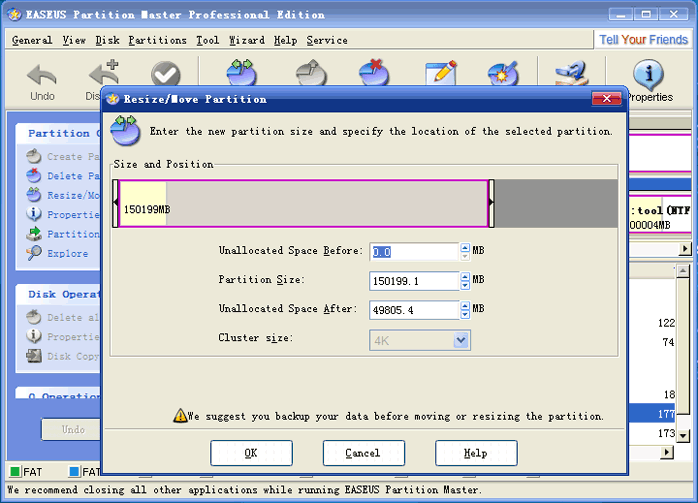
Ao fazerem "Apply" vai ser pedido para fazerem um restart, e ao reiniciar o Windows as alterações serão aplicadas. Caso nessa operação obtenham uma mensagem de erro ( por exemplo "Error Code 9"), entrem novamente no Windows e:
terça-feira, 8 de julho de 2008
Mysql ERROR 1030: Got error 127 from table handler
Em Mysql, ao fazer um select apanhei com isto: ERROR 1030: Got error 127 from table handler
o erro 127 tem a seguinte descrição
MySQL error code 127 = Record-file is crashed
Para resolver este problema, um 'repair table nome_da_tabela' deverá chegar:
docs do mysql
Dependendo do tamanho da tabela este comando pode demorar um bocado a executar.
O resultado do comendo (no meu caso):
mysql> repair table nomedatabela;
+------------------------+--------+----------+--------------------------------------------------+
| Table | Op | Msg_type | Msg_text |
+------------------------+--------+----------+--------------------------------------------------+
| dbtest.nomedatabela | repair | info | Wrong bytesec: 0- 0- 0 at 796247780; Skipped |
| dbtest.nomedatabela | repair | info | Wrong bytesec: 0- 0- 0 at 891424052; Skipped |
| dbtest.nomedatabela | repair | warning | Number of rows changed from 2365148 to 2365144 |
| dbtest.nomedatabela | repair | status | OK |
+------------------------+--------+----------+--------------------------------------------------+
4 rows in set (10 min 50.84 sec)
A tabela tinha 1946433 registos... daí os 10 minutos.
E voilá, problema resolvido
o erro 127 tem a seguinte descrição
MySQL error code 127 = Record-file is crashed
Para resolver este problema, um 'repair table nome_da_tabela' deverá chegar:
docs do mysql
Dependendo do tamanho da tabela este comando pode demorar um bocado a executar.
O resultado do comendo (no meu caso):
mysql> repair table nomedatabela;
+------------------------+--------+----------+--------------------------------------------------+
| Table | Op | Msg_type | Msg_text |
+------------------------+--------+----------+--------------------------------------------------+
| dbtest.nomedatabela | repair | info | Wrong bytesec: 0- 0- 0 at 796247780; Skipped |
| dbtest.nomedatabela | repair | info | Wrong bytesec: 0- 0- 0 at 891424052; Skipped |
| dbtest.nomedatabela | repair | warning | Number of rows changed from 2365148 to 2365144 |
| dbtest.nomedatabela | repair | status | OK |
+------------------------+--------+----------+--------------------------------------------------+
4 rows in set (10 min 50.84 sec)
A tabela tinha 1946433 registos... daí os 10 minutos.
E voilá, problema resolvido
terça-feira, 1 de julho de 2008
Avalia o teu site! Quanto vale o teu site?
O site dnscoop permite digitar o nome de um site e automaticamente a ferramenta gera uma série de informação (com algum interesse) e com base nela calcula o valor do site... Duvidam? Experimentem... Na realidade não me parece que se aplique muito bem, em particular aos sites mais pequenos.
Para sites maiores, até pode ser que o valor seja mais real.
Exemplos interessantes:
valor do sapo.pt $17,757,200 (17 milhoes de dolares)
valor do aeiou.pt $6,361,280
valor do olhares.com $7,745,452
Curiosamente 51% da empresa detentora do olhares.com foi comprada pelo aeiou por aproximadamente 400 mil euros, o que comparando com os 7.7 milhões indica, ou que o site foi sub-avaliado na venda ou que esta ferramenta não tem resultados muito bons.
Na opinião de quem não conhece o olhares por dentro, parece-me que o valor de 400 mil euros é baixo para mais de 30M de page views (tal como foi divulgado), no entanto também penso que comercialmente um site de fotografia não será muito facilmente monetizado, daí que o valor também não possa ser tão elevado como 7M
Para sites maiores, até pode ser que o valor seja mais real.
Exemplos interessantes:
valor do sapo.pt $17,757,200 (17 milhoes de dolares)
valor do aeiou.pt $6,361,280
valor do olhares.com $7,745,452
Curiosamente 51% da empresa detentora do olhares.com foi comprada pelo aeiou por aproximadamente 400 mil euros, o que comparando com os 7.7 milhões indica, ou que o site foi sub-avaliado na venda ou que esta ferramenta não tem resultados muito bons.
Na opinião de quem não conhece o olhares por dentro, parece-me que o valor de 400 mil euros é baixo para mais de 30M de page views (tal como foi divulgado), no entanto também penso que comercialmente um site de fotografia não será muito facilmente monetizado, daí que o valor também não possa ser tão elevado como 7M
Subscrever:
Mensagens (Atom)